Joyride MCP plugs your fleet into Claude, ChatGPT and the other AI tools you already use. Ask a question, build a dashboard or fix a problem without ever leaving your chat.
What if one ChatGPT prompt could show you which golf carts are costing you the most? Or a Claude command that recouped 20 minutes of e-bike unlocks? Joyride MCP is a secure connector that links your Joyride fleet management dashboard to Claude, ChatGPT, Perplexity and the other AI tools you use every day. Ask about your fleet in plain words, build custom dashboards from live data, and lock a vehicle or refund a ride without leaving the chat.
Type “Where is my biggest opportunity to make more money?” into Claude and get a full-scale business analysis taken from the fleet data your dashboard collects. Then lock a vehicle, refund a ride or open a work order in the same conversation. The result, ultimately, is actionable insights and time back in your day to focus on scaling your fleet and business.
What is Joyride MCP?
Joyride MCP is a fleet management MCP connector that lets AI tools like Claude and ChatGPT read your Joyride fleet data and carry out tasks you approve. MCP stands for Model Context Protocol, an open standard that lets AI assistants connect safely to outside software. Think of it as a universal plug with one connector, and every MCP-compatible AI tool can talk to Joyride.
It uses your existing Joyride login, so your team’s permissions carry over automatically.
Here’s how it works:
- You ask in Claude, ChatGPT, n8n or another AI tool
- Joyride MCP securely authorizes your credentials
- Your LLM can build reports, answer questions and perform actions directly in the chat
What you can do with Joyride MCP
The Joyride dashboard is a treasure trove of information that instantly stores analytics on data points like user behavior, ride data, completed/ongoing trips and revenue figures, while also carrying out actions for work orders, in-app customer messaging and marketing promotions, rider support, underpayment recoveries and more. With Joyride MCP, now anything you can track, analyze and perform within the dashboard, you can now do from your AI tool of choice. For example:
Ask about your fleet. Rides, riders, vehicles, payments, rentals, promos, tickets, work orders and zones are all fair game, allowing you to build extremely curated dashboards that feature the information that matters to you most. Here are just a few prompt examples:
1. “Compare all my fleets by rides, revenue, work order cost and net for the last 90 days. Which fleet earns the most per vehicle?” Shows which fleets are pulling their weight and which are dragging down margins.
2. “Show monthly rides and revenue for [fleet] over the last 12 months, and call out the best and worst months.” Shows seasonality and growth trends at a glance.
3. “Which 10 vehicles in [fleet] earn the most, and which 10 earn the least? Include rides, revenue per ride and last ride date.” Shows where to add vehicles and which ones are underperforming.
4. “Analyze which marketing activities between push notifications, banners and referral codes are growing revenue the fastest” Finds marketing strengths and how to capitalize on them further.
5. “What times of day and days of the week get the most rides in [fleet]?” Helps plan staffing, charging and rebalancing around demand.
Learn how Joyride works. Answers come from Joyride’s official help content. “How do I create a promo?” will lead to a step-by-step walkthrough of setting up Joyride’s in-app marketing promotions feature.
Get work done. Lock a cart, refund a ride or log a flat tire from the chat. Prompts can include topping up a rider’s wallet, force-ending a ride and creating a work order. It talks like an operator.
Sync seamlessly with your other tools
Claude and ChatGPT already connect to Gmail, Slack, Google Sheets and more, so Joyride data can flow straight into the rest of your day. Here are a few ideas:
- Maintenance: “Pull every open work order at Outer Banks and email a summary to our mechanic.”
- Inventory: “How many carts are ready to rent at each location? Put it in a Google Sheet.”
- Morning check-in: “List carts in the shop and today’s pickups, then post it to our #ops channel.”
Joyride MCP handles the Joyride side, while your AI tool handles the email, sheet or Slack message through its own connectors.
Build custom views in minutes
Since your Joyride dashboard is packed with automated tools and powerful fleet data, Joyride MCP curates it any way you like. Describe the view you want in plain words, and Claude builds it from your live data.
We put it to the test with sample rental businesses running multiple locations. Everything below was built in ChatGPT or Claude using only Joyride MCP without the need for spreadsheets, exports or a developer.
Start with a question
It can be as simple as one line that lets ChatGPT reach into Joyride.
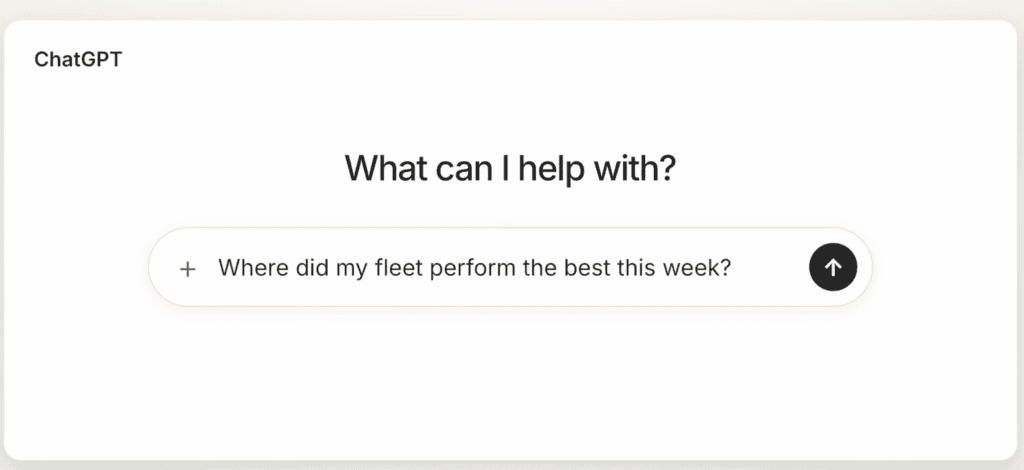
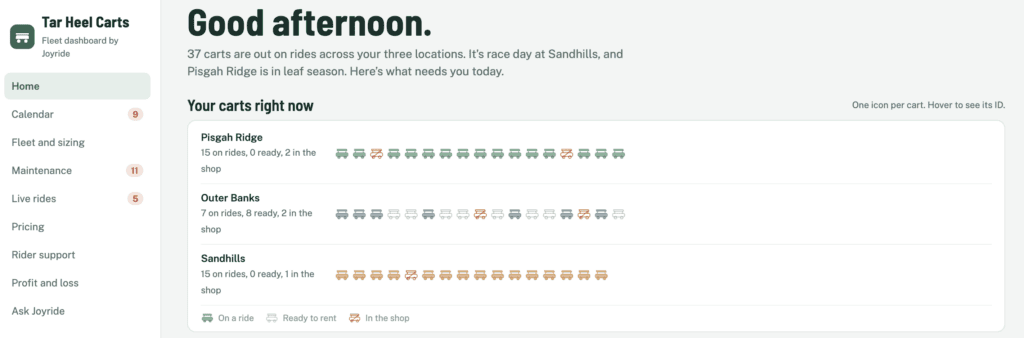
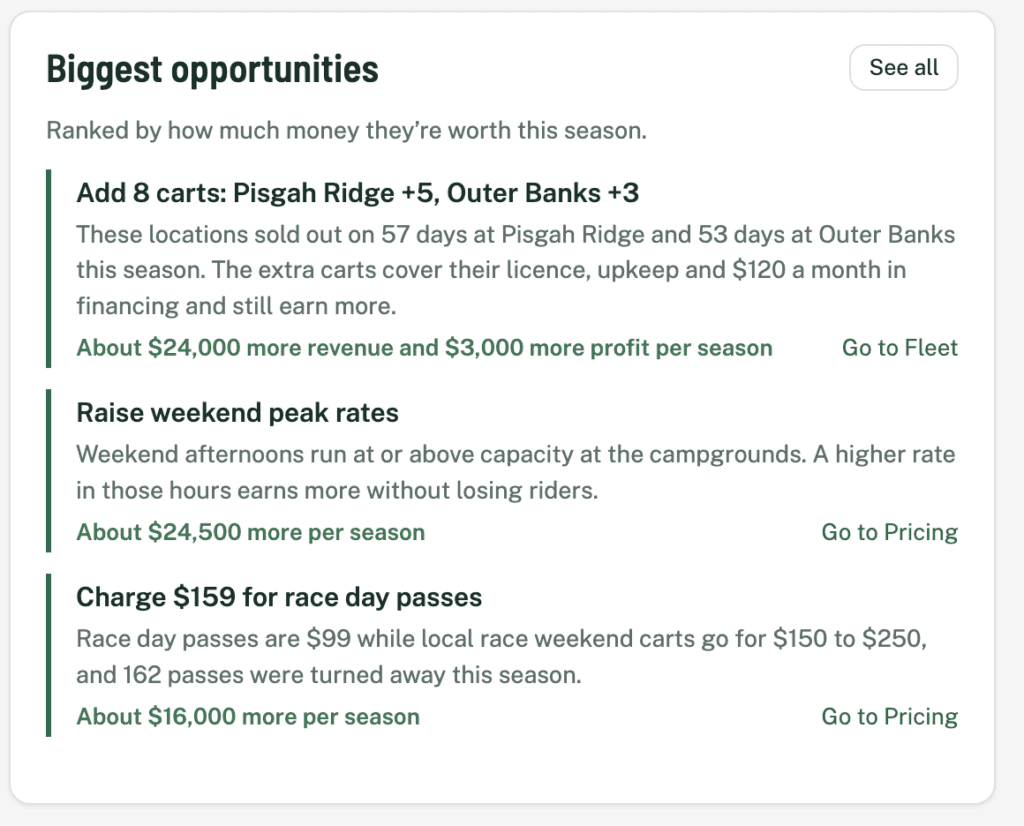
A view of every cart and business opp
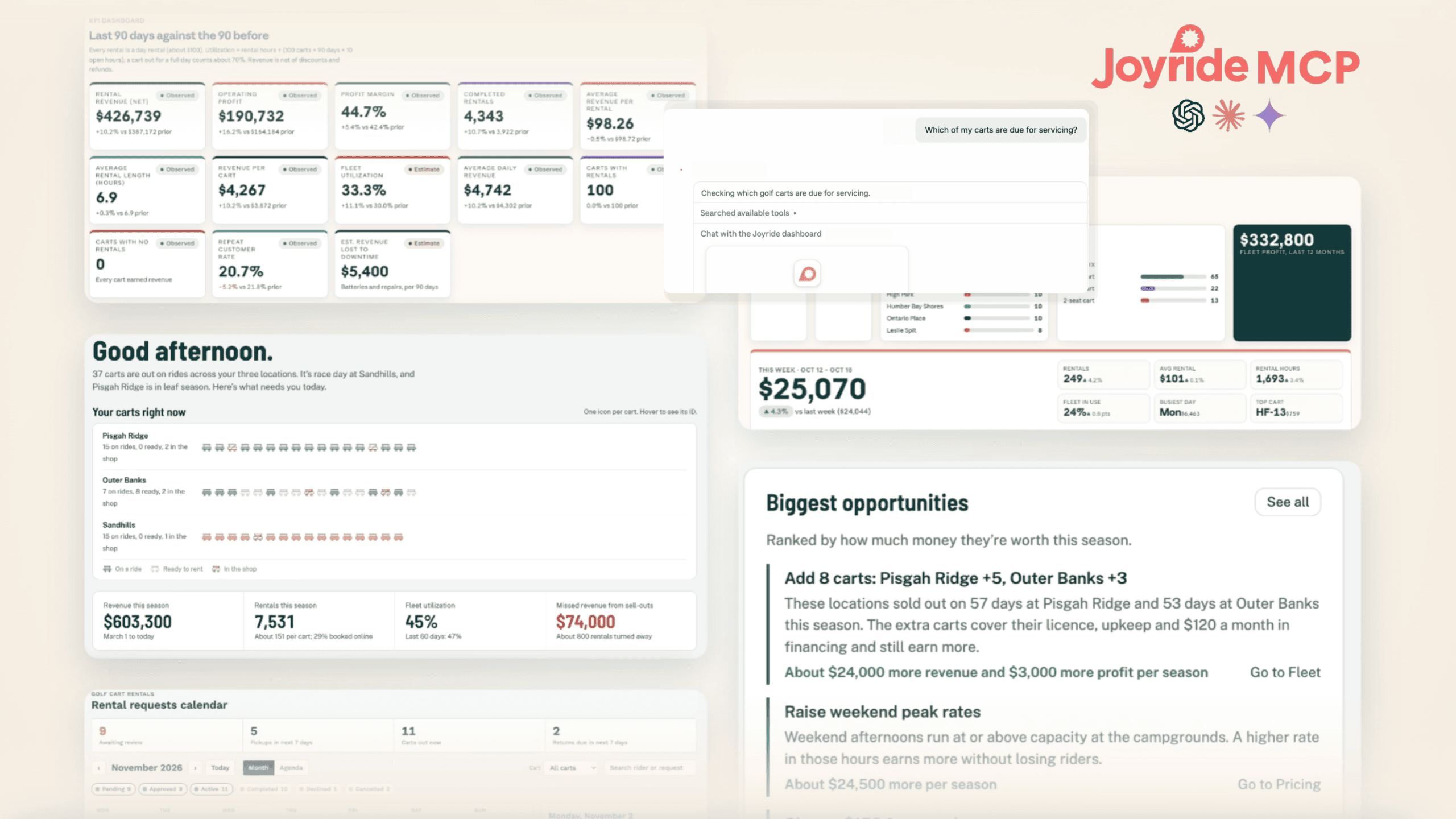
Get a Claude report in real time showing which fleet has carts out on rides and which are fully booked for the day. Take it a step further and pinpoint the biggest revenue opportunities for your business.
KPIs, your way
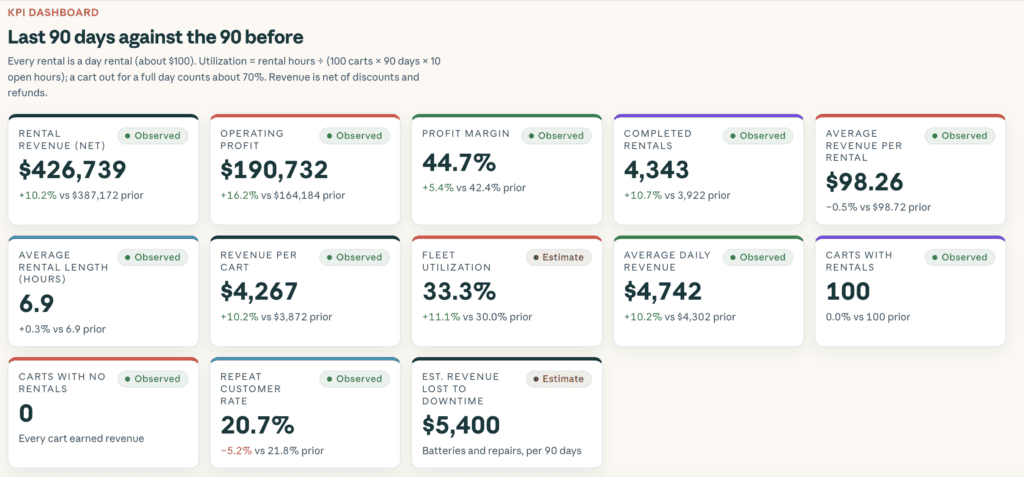
This dashboard compares the last 90 days to the 90 before, across revenue, profit margin, utilization, repeat customers and revenue lost to downtime. Each number is labeled as observed or estimated, so you know what’s hard data.
A rental calendar built for your counter
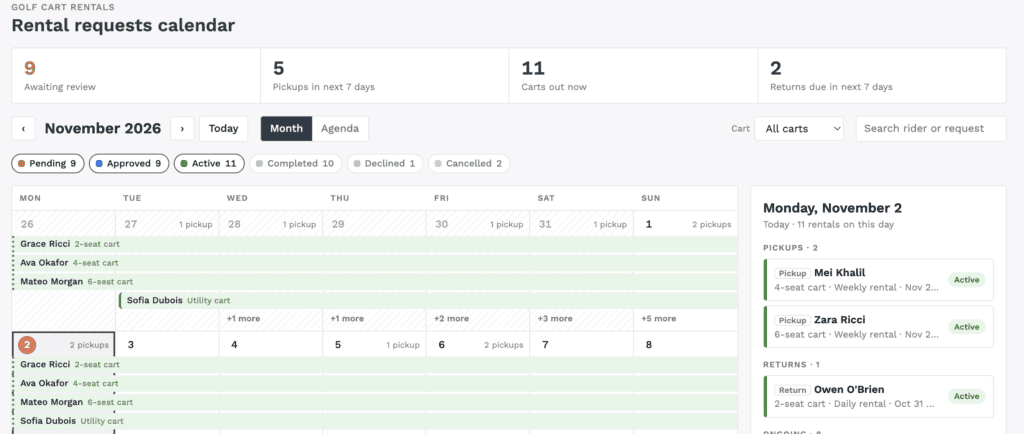
Pending requests, upcoming pickups, carts out now and returns due, all on one calendar. Filter by cart type or search by rider, and see today’s pickups and returns in a side panel, all built by Claude.
Built with safeguards in place
Joyride MCP works with live fleet data, so safety is at the backbone of the whole operation.
You approve every change. Each task shows up as a clear summary with Approve and Decline buttons. Only what you see gets done, and the AI tool can never approve on its own. Unanswered requests expire after 10 minutes.
Your permissions come along for the ride. Team members see only their own fleets, role permissions and tasks. There’s nothing extra to set up.
Sensitive data stays put. Passwords, card details and ID documents are never shown. Each operator’s data is kept separate, and every change goes through Joyride’s official channels.
Guardrails are built in. It handles up to two tasks per message, each on one named record. Bulk requests like “lock every vehicle” are declined, and unsupported tasks like deleting a fleet are refused. When in doubt, it says no rather than over-share.
Why we launched Joyride MCP
Joyride MCP represents an evolution of Joyride’s AI-rich fleet management platform. From our AI assistant within the dashboard to automated payment recovery tools and operational hour settings, aligning our backend dashboard with the LLMs already being used by our operators aligns with our mandate to make fleet management as seamless as possible for busy operators and properties. As the OS for lightweight mobility, our MCP makes the entire Joyride ecosystem that much more powerful without losing touch with each customer’s highly individualized growth story.
Taking “fully integrated” to the next level
Joyride MCP is part of our fully integrated software-hardware ecosystem. Joyride’s own Neon IoT hardware, rental apps, payments, maintenance tools and fleet dashboard all run on one platform, so a single question in Claude or ChatGPT can reach from a cart’s battery level to a rider’s payment history to an open work order, without stitching together data from separate vendors. It’s also built for operators, meaning there are no API keys or configuration files to manage. You sign in with your existing Joyride account, and your team’s role permissions apply automatically. Every action waits for your approval right in the chat, so you get the speed of AI with the control you expect from the platform that runs your fleet. To learn more about connecting Joyride MCP and more prompt possibilities, reach out to us here.
Frequently asked questions
What is Joyride MCP?
Joyride MCP is a connector that links your Joyride fleet management dashboard to AI tools like Claude, ChatGPT and Perplexity. It brings data from Joyride’s fleet management platform into your conversations, so you can ask questions, build custom reports and carry out approved tasks wherever you work.
Does Joyride MCP work with the Joyride dashboard?
Yes. Joyride MCP and the Joyride dashboard read from the same data, so they work hand in hand. Use Joyride MCP when you’re already working in Claude, ChatGPT or Perplexity, and the dashboard’s built-in tools, including Ask Joyride, whenever you’re in Joyride.
Which AI tools work with Joyride MCP?
Joyride MCP works with Claude, ChatGPT, Perplexity, n8n and any other AI tool that supports the Model Context Protocol (MCP).
Is Joyride MCP secure?
Yes. It uses your Joyride sign-in and the same role permissions as your dashboard. Passwords, card details and ID documents are never shown, and each operator’s data is kept separate.
Can the AI change my fleet without my permission?
No. Every change appears as an Approve or Decline card in your chat, and nothing happens until you approve it. The AI tool can’t approve anything on its own, and unanswered requests expire after 10 minutes.
What tasks can Joyride MCP do?
It can lock or unlock a vehicle, force end a ride, refund a ride, charge a rider, top up a rider’s wallet, and create or update a work order. Bulk actions like locking every vehicle are declined.
Can I build custom dashboards with Joyride MCP?
Yes. Ask Claude or another AI tool to turn your Joyride data into a KPI dashboard, rental calendar or fleet status view. The numbers come from the same source as your Joyride dashboard, so they match.
Will my team members see data they shouldn’t?
No. Each person sees only the fleets, sections and tasks their Joyride role allows. Permissions apply automatically, with nothing extra to configure.
How do I set up Joyride MCP?
Copy your connector link from Settings → AI Integration in the Joyride dashboard. Add it as a custom connector in your AI tool and sign in with your Joyride account. It takes a few minutes.
Your fleet is one question away
Joyride MCP is available now for Joyride customers. Access your connector link under Settings → AI Integration, plug it into your preferred AI tool, and focus on growing your business.
Not on Joyride yet? Book a demo and we’ll show you Joyride MCP in action alongside the rest of our fleet management platform.